03 / Editor guide
Your dependencies.
The Zed way.
Native diagnostics, hovers, and code actions bring dependency intelligence into Zed. Open a manifest and start with the signals already in your editor.
- Integration
- Language Server Protocol
- Setup
- No settings required
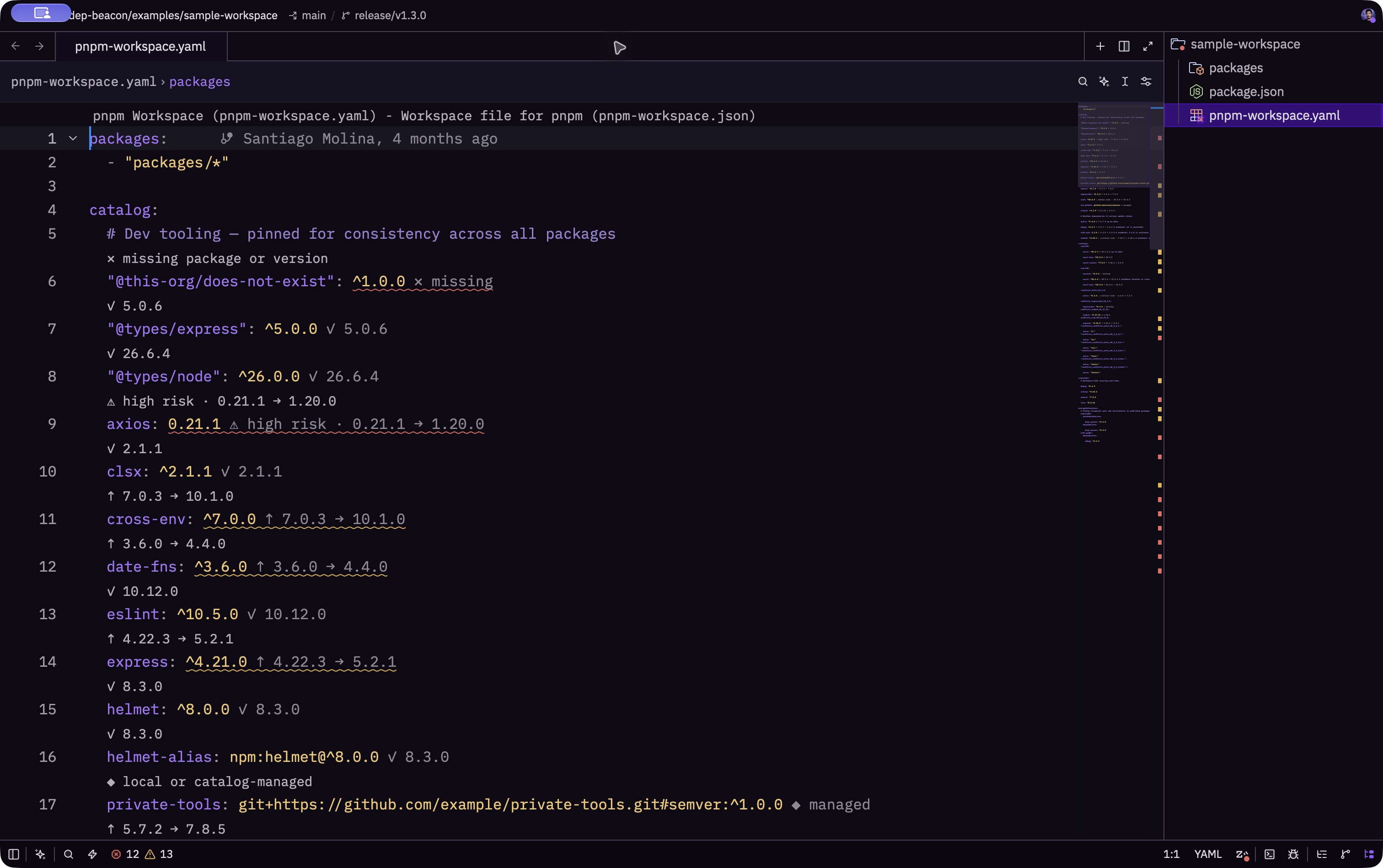
Open a manifest and get started
- Find Dep Beacon.
Open the command palette, run
zed: extensions, and search forDep Beacon. - Install the extension.
Use version
0.0.3or newer for the diagnostics and bulk-update workflow in this guide. - Open your workspace.
Start with
package.json,pnpm-workspace.yaml, orpnpm-workspace.yml.
See what needs attention
Click Zed’s error and warning indicator, or run diagnostics: deploy, to see actionable dependencies from open manifests in one editable multi-buffer. Updates appear as warnings; security findings use warnings or errors according to severity.
- Dependency dashboard
- ⌘ ⇧ M on macOS; CtrlShift M on Linux and Windows.
- Code actions
- ⌘ . on macOS; Ctrl . on Linux and Windows.
Hover a dependency for resolved ranges, npm tags, update targets, and vulnerability details. Dependency-name links open npm. Default and named pnpm catalogs resolve before analysis.
Update one dependency, or the manifest
Place the cursor on an actionable dependency, then open code actions.
- Patch, minor, major, latest
- Apply the selected target to one dependency.
- Update all compatible dependencies
- Apply available compatible targets without crossing a major version.
- Update all dependencies to latest
- Move to latest targets, which can include breaking major-version updates.
Bulk actions appear when the selected dependency has an applicable manifest edit. For a catalog:or catalog:<name> reference, the update edits its owning entry inpnpm-workspace.yaml.
Understand the tag as well as the range
npm can publish a version under a tag such as next while latest still points to an older version. If the existing range already accepts that newer version, Dep Beacon explains the difference without offering a no-op edit or downgrade.
Keep the defaults, or tune the signals
Configure the language server under lsp.dep-beacon.settings in your Zed settings file. Enable inlay hints separately if you want compact version and risk labels beside each dependency.
{
  "lsp": {
    "dep-beacon": {
      "settings": {
        "checkVulnerabilities": true,
        "includePrerelease": false,
        "registryUrl": "https://registry.npmjs.org",
        "showUpdateDiagnostics": true
      }
    }
  }
}{
"inlay_hints": {
"enabled": true,
"show_other_hints": true
}
}checkVulnerabilities- Defaults to
true. Adds OSV.dev vulnerability details to dependency analysis. includePrerelease- Defaults to
false. Opt in to consider prerelease versions. registryUrl- Defaults to the public npm registry.
showUpdateDiagnostics- Defaults to
true. Set it tofalseto hide update warnings while keeping security findings and manifest errors visible.
Disabling update diagnostics keeps analysis, hovers, code actions, and individual or bulk upgrades available.
Follow the source
Explore the Zed adapterand language serverin the Dep Beacon repository.