02 / Editor guide
Stay on the line.
Work in VS Code.
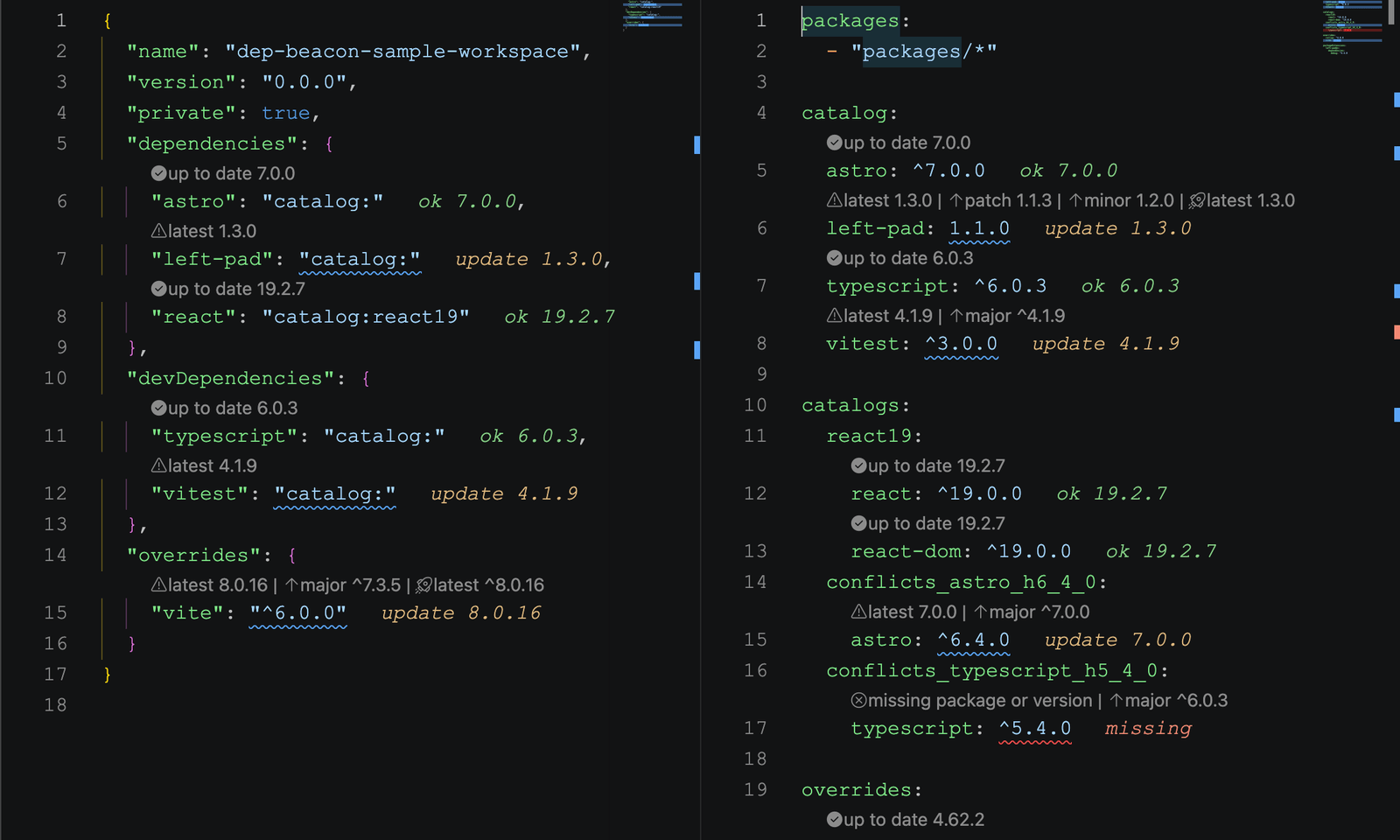
Version signals, CodeLens actions, and dependency details live beside the manifest entries you are already editing.
- Actions
- CodeLens + quick fixes
- Context
- Hovers + inline labels
Choose your next update
Open package.json, pnpm-workspace.yaml, or pnpm-workspace.yml. CodeLens presents applicable targets directly above supported entries.
patch- The highest available patch in the current minor version.
minor- The nearest higher minor in the current major version.
major- The nearest higher major version.
latest- The npm latest dist-tag, or the newest stable version when that tag is unavailable.
Inspect first, then apply
Hover a dependency name or range to inspect its resolved and latest versions, available update targets, npm links, and vulnerability details. The quick-fix menu can update one dependency, all compatible dependencies, or all dependencies to latest in the current manifest.
Catalog-backed actions edit the matching pnpm catalog entry. Major and latest updates can cross a breaking version boundary; review the package’s release notes and test the consuming code.
Keep useful commands close
Open the command palette and search for Dep Beacon:.
- Refresh Dependency Signals
- Re-analyze visible manifests.
- Clear Registry Cache
- Clear cached npm metadata and refresh dependency information.
- Toggle Prerelease Versions
- Include or exclude prerelease versions in update targets.
- Sort Current Manifest
- Alphabetize package sections in package.json.
- Run Package Install
- Start the selected package manager’s dependency install from VS Code.
- Show Debug Output
- Inspect activation, refresh, cache, parse, analysis, and diagnostic details in the output channel.
A small signal, a clear meaning
- Green · current
- The declared range already accepts the latest stable version.
- Yellow · update
- A newer target is available.
- Orange · advisory
- OSV reports low or medium vulnerability risk.
- Red · attention
- A package or version is invalid, missing, or has high or critical vulnerability risk.